
Rhythm Tiles : Piano Game
Boom Studio LimitedMusic
4.5129.00 Reviews
- Version
- 1.5.13
- Installs
- 10.00M
- Age Rating
- Everyone
Screenshots
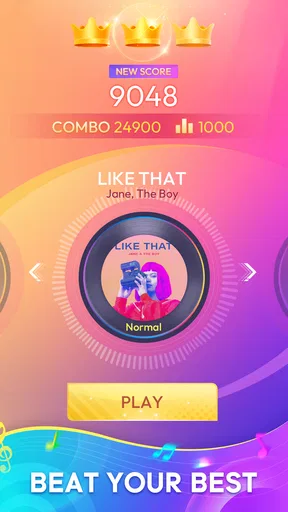

Our Review of Rhythm Tiles : Piano Game
 Analysis by Appyee
My first expectation for Rhythm Tiles: Piano Game was a quick, music-led game I could understand without a tutorial. That is the right way to approach it: the central appeal is tapping along in time, not learning a complicated control scheme. As a free music game from Boom Studio Limited, it suits short sessions when I want to focus on a beat for a few minutes. The store shows a 4.8 average from around 10,000 ratings and over 10 million installs, which suggests it has found a broad audience, though popularity alone cannot tell you whether its pace or song selection will suit you.
What to expect from the first session
The game is built around rhythm and timing, so expect your attention to move between the music and the tiles on screen. It can feel approachable at first, but keeping accurate timing becomes more demanding as you play. I would treat an early miss as part of getting used to the rhythm rather than a sign that the game is too difficult. A calm first attempt is more useful than trying to chase a score immediately.
That distinction matters if you are used to music apps that let you simply choose a track and listen. This is an active game: you need to watch, listen and respond together. It is a better fit for a short break when you want something hands-on than for times when you would rather let music play in the background. The age rating is Everyone, but the timing demands may still be more appealing to players who enjoy concentration games.
Getting started without overthinking it
When I open a rhythm game for the first time, I prefer to begin with the simplest available play option and learn the basic timing before worrying about scores or showing anyone how I did. The same approach makes sense here. Keep your first session short, settle into the beat, and notice whether you are reacting to the music or just tapping as quickly as possible. Those are not the same thing, and rushing can make a song feel harder than it needs to.
The game is free to install, with in-app purchases listed from $0.49 to $75.88 per item. I would start without buying anything and decide first whether I enjoy the core play loop. That gives you a fair sense of its appeal before spending money. It also helps keep the game in perspective: the useful question is not whether every option is available immediately, but whether the basic rhythm challenge is satisfying enough to return to.
Finding a first meaningful success
My practical goal for a first session would be to finish a song while keeping a steady pace, rather than trying to make every tap perfect. That small target gives you a clearer read on the controls and the music. If you lose the beat, pause mentally, listen for the pulse again, and continue instead of making a string of hurried taps to catch up. Rhythm games reward consistency more than frantic movement.
For a realistic everyday use, imagine waiting for a ride or taking a brief break between tasks. One focused attempt can be enough to make that spare time feel more engaging, and you can stop once your attention starts to wander. Playing in a noisy place may make it harder to follow the music, so a quieter moment is a better time to judge whether the timing feels natural. I would also avoid starting a challenging run when I need to keep half an eye on something else; split attention can turn a relaxing break into frustration.
The Beat Goes On: Gameplay and Features
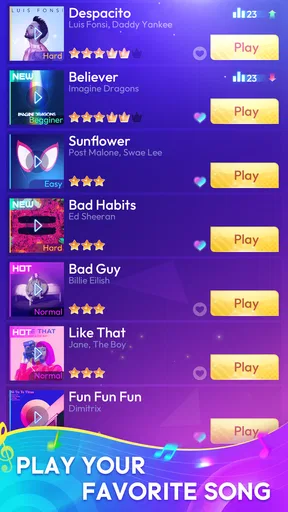
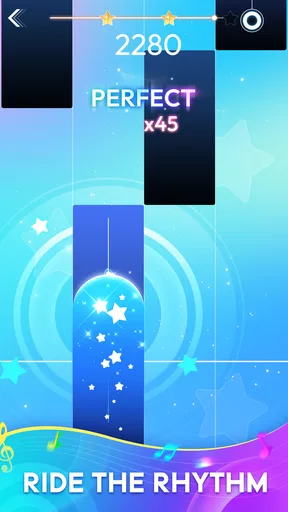
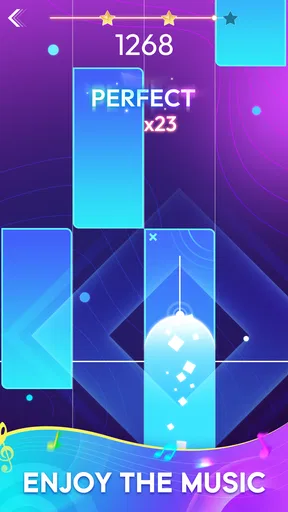
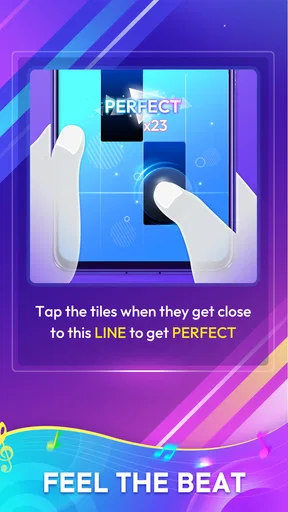
First off, let's talk gameplay. Rhythm Tiles: Piano Game is all about timing and precision. You tap the tiles as they scroll down your screen, perfectly synced with the music. Sounds simple, right? Well, it starts easy but quickly ramps up, turning into a real finger workout. The game offers a variety of tracks, ranging from classical pieces to modern hits, so there's something for everyone.
One feature I particularly love is the difficulty settings. Whether you're a newbie or a seasoned pro, you can adjust the level to suit your skills. The game even has a special "hardcore" mode for those who like a challenge. Trust me, this mode is not for the faint-hearted!
Visuals and Sound
Now, let’s dive into the visuals and sound, which are just as important as the gameplay in rhythm games. The graphics in Rhythm Tiles: Piano Game are sleek and vibrant, with a design that keeps your eyes glued to the screen. Each tile lights up beautifully as you hit it, creating a satisfying visual feedback loop that makes you want to keep playing.
As for the music, the sound quality is top-notch. The game developers have done a fantastic job in curating a playlist that keeps the momentum going. It's not just the tunes that are impressive; the sound effects are crisp, adding to the overall immersive experience. There's nothing quite like nailing a perfect combo and hearing that rewarding sound!
Making the music work for you
One useful habit is to listen for the pulse of a track before trying to play at full speed. If you are looking at every tile as an isolated instruction, it is easy to tense up and lose the musical pattern. Let the beat guide your timing, then use the visual movement to confirm what you hear. This is especially helpful when a song feels busier: reacting to a pattern is more manageable than treating every tap as a surprise.
There is also a practical trade-off between sound and convenience. Playing with audio makes it easier to connect taps to the rhythm, while playing silently may be less distracting in a shared space but can make timing feel less intuitive. If you are using the game somewhere quiet, keep the volume comfortable rather than turning it up to mask every other sound. When the environment is loud, I would save a serious score attempt for later instead of blaming myself for a run that was hard to hear.
How it compares with other rhythm games
Compared with rhythm games that put more emphasis on elaborate progression or a large set of modes, this one is easiest to appreciate as a direct tap-and-listen challenge. That simplicity is a strength when you want to get into a song quickly, but it may feel limited if you are looking for deep customization, a long-term competitive ladder, or a game that doubles as a broad music library. It is also different from simply playing songs in a music app: here, the music is part of a timing test, so your attention matters throughout.
If your main goal is to relax by listening, a regular music player is the better choice. If you want a more involved music game with detailed practice tools or a particular artist-focused catalog, another rhythm title may be a closer match. I would choose this one when I want immediate, tactile play and am happy to judge it by the feel of its beat-and-tile loop rather than by how many extra systems it offers.
Visuals and Sound
Now, let’s dive into the visuals and sound, which are just as important as the gameplay in rhythm games. The graphics in Rhythm Tiles: Piano Game are sleek and vibrant, with a design that keeps your eyes glued to the screen. Each tile lights up beautifully as you hit it, creating a satisfying visual feedback loop that makes you want to keep playing.
As for the music, the sound quality is top-notch. The game developers have done a fantastic job in curating a playlist that keeps the momentum going. It's not just the tunes that are impressive; the sound effects are crisp, adding to the overall immersive experience. There's nothing quite like nailing a perfect combo and hearing that rewarding sound!
Why It's Worth Your Time
So, why should you give Rhythm Tiles: Piano Game a shot? For starters, it's incredibly addictive. The thrill of beating your high score or mastering a difficult song keeps you coming back for more. Plus, the app is super user-friendly, with intuitive controls that even a beginner can pick up in no time.
Another reason is the community aspect. The game allows you to connect with friends, challenge them to beat your scores, and even share your achievements on social media. It's a fun way to engage with others and show off your skills.
Who will enjoy it, and who may not
I would recommend it to someone who likes brief skill-based games, enjoys following a beat, or wants a more active way to spend a spare moment. It can also work well for friends who like comparing scores: a quick challenge gives a simple reason to replay a track and improve. Its appeal is less obvious for players who dislike repeating a song to improve their timing, or who want to play with minimal screen attention.
Version 1.5.13 is listed for devices running Android 6.0 or later. Before installing, I would check that the device meets that requirement and leave enough attention for the game itself; fast tapping on a small or awkwardly held screen can be uncomfortable. If your phone is older or tends to lag in games, keep your first try low-pressure. Even a small delay can make a rhythm challenge feel unfair, so smooth play matters more here than it would in a turn-based game.
Room for Improvement
Of course, no app is perfect, and there are a few areas where Rhythm Tiles: Piano Game could improve. One thing I noticed was that while the variety of songs is great, I would love to see more frequent updates with new tracks. Keeping the playlist fresh would definitely enhance the long-term appeal.
Additionally, while the app runs smoothly most of the time, there were a few instances of lag on older devices. It's not a deal-breaker, but something to be aware of if you're playing on an older phone.
Common points of confusion
A common misunderstanding is to assume that faster tapping automatically means better play. It does not: the aim is to match the rhythm, and hurried taps can throw off your timing. Another is to judge the whole game from one difficult attempt. I would first try a comfortable song or difficulty, then decide whether I enjoy the basic feel before moving up. If the music is hard to hear in your surroundings, change the setting of your session rather than treating that run as a fair test of your ability.
It is also worth separating a purchase prompt from the question of whether the game is enjoyable. Since there are optional purchases, take a moment to check what an offer is for before confirming anything, and do not spend just to make a first session feel worthwhile. The free starting point lets you decide whether the rhythm play is your kind of fun. If you are choosing it for children, the Everyone rating is reassuring, but I would still check purchase choices together and set expectations about optional spending.
Room for Improvement
Of course, no app is perfect, and there are a few areas where Rhythm Tiles: Piano Game could improve. One thing I noticed was that while the variety of songs is great, I would love to see more frequent updates with new tracks. Keeping the playlist fresh would definitely enhance the long-term appeal.
Additionally, while the app runs smoothly most of the time, there were a few instances of lag on older devices. It's not a deal-breaker, but something to be aware of if you're playing on an older phone.
Final Thoughts
All in all, Rhythm Tiles: Piano Game is a fantastic addition to any mobile gamer's library. Its engaging gameplay, stunning visuals, and high-quality sound make it a standout in the rhythm game category. Whether you're looking to kill some time or dive deep into a new gaming obsession, this app has got you covered.
So, why not give it a try? Download Rhythm Tiles: Piano Game today and start tapping your way to musical mastery!
Verdict
Strengths of Rhythm Tiles : Piano Game
- Smooth, responsive touch controls.
- Vast library of popular songs.
- Visually appealing interface.
- No internet required to play.
- Frequent updates with new tracks.
Limitations of Rhythm Tiles : Piano Game
- Ads can be intrusive during gameplay.
- Limited free song availability.
- In-app purchases can be costly.
- Occasional lag on older devices.
- Requires large storage space.
Other Releases by Boom Studio Limited
View All
Rhythm Rush - Piano Music Game
Music4.4
Similar Picks in This Category
View All
Tiles Hop Music & Ball Game
AMANOTES PTE. LTD.4.3

Magic Tiles 3™ - Piano Game
AMANOTES PTE. LTD.4.6

Real Piano
Bilkon3.7

Piano Game: Classic Music Song
Dream Tiles Piano Game Studio4.0

Smash Colors: Music Ball Rush
BADSNOWBALL HONGKONG LIMITED4.2

Piano Music Go-EDM Piano Games
Joy Journey Music Games4.5
Frequently Asked Questions
What is Rhythm Tiles: Piano Game about?
Rhythm Tiles: Piano Game is a music-based arcade game that challenges players to tap on tiles in rhythm with the music. As you progress, the speed and complexity increase, offering an engaging and immersive experience that tests your timing and coordination skills. It's perfect for music lovers who enjoy a challenge.
Is Rhythm Tiles: Piano Game free to play?
Yes, Rhythm Tiles: Piano Game is free to download and play. However, it includes in-app purchases that allow players to unlock additional songs, remove ads, or gain other advantages. While you can enjoy the game without spending money, these purchases can enhance your experience.
What are the system requirements for Rhythm Tiles: Piano Game?
Rhythm Tiles: Piano Game requires iOS 10.0 or later for Apple devices and Android 5.0 or later for Android devices. It is optimized for both smartphones and tablets, ensuring smooth performance across different platforms. Make sure your device is updated to the latest operating system to avoid any compatibility issues.
Does Rhythm Tiles: Piano Game offer multiplayer features?
Currently, Rhythm Tiles: Piano Game focuses on single-player experiences. However, it features leaderboards where you can compete against other players globally. This allows you to challenge yourself and see how you rank against others, adding a competitive edge to your gameplay.
How often is new content added to Rhythm Tiles: Piano Game?
The developers of Rhythm Tiles: Piano Game frequently update the app to include new music tracks and features. These updates aim to keep the game fresh and engaging. It's recommended to enable notifications or regularly check the app store for the latest updates to enjoy new content as it's released.
Play our best games!


